
Monitoring resting breathing rates is a critical health goal for senior dogs (<30 breaths per minute is what you’re looking for with your puppers) . I built this custom tool to manage my own pack of 5, and now you can use it too!
Step-by-Step Instructions
- Download & Install:
- Android Users: Click the link below to download the
.apkfile. Your phone will show a warning about “Installing apps from unknown sources” or “Non-Google Play apps”. This is a standard security prompt for custom-built apps—simply click Settings and Allow or Install Anyway to proceed. - iPhone/iOS Users: Please note that due to Apple’s “walled garden” restrictions, this app won’t run on iPhones. If you have an Android tablet it will work there!
- Android Users: Click the link below to download the
- Select Your Dog: Tap the list to choose which dog you are checking. This ensures the history is saved to the correct profile.
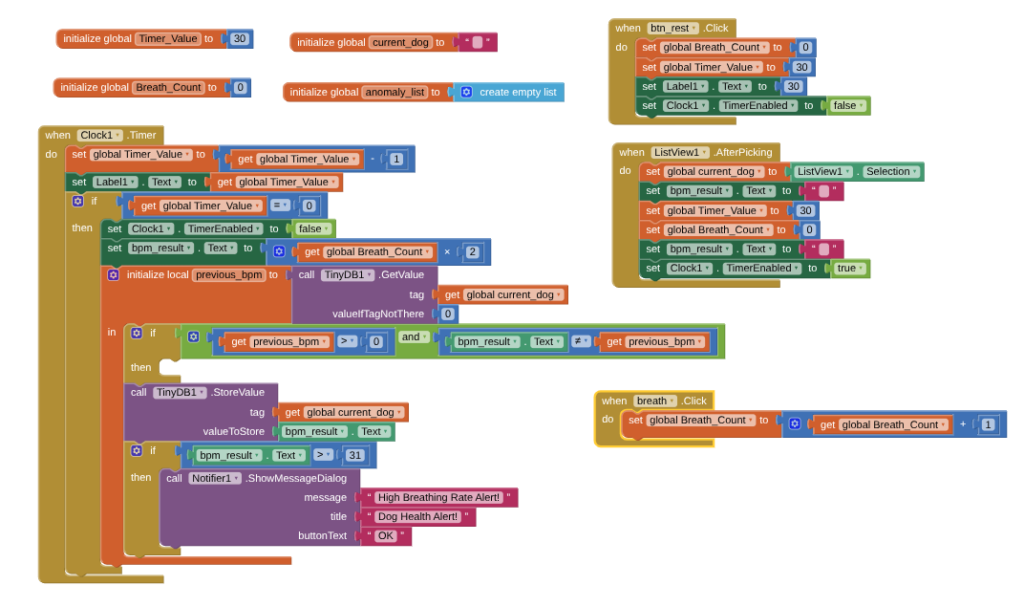
- The 30-Second Count: The timer will start automatically. Watch your dog’s chest and tap the “Breath” button every time they exhale.
- Instant Calculation: When the timer hits zero, the app automatically doubles the count to give you the full Beats Per Minute (BPM).
- Smart Alerts: The app will compare today’s rate to yesterday’s. If the rate has changed or exceeds 30 BPM, you will receive an instant alert on your screen.
Privacy & Security Statement
Your Data Stays With Your Pack I built this app with a “Privacy First” mindset for my own 5 dogs, and I’ve extended that same protection to you.
- No Cloud Storage: This app uses TinyDB technology, which means every breath count and health alert is stored locally on your device only.
- No Data Collection: I do not (and cannot) see your dog’s names, breathing rates, or health history. There is no central database harvesting your information.
- No Accounts Required: You do not need to sign up, log in, or provide an email address to use this tool.
- Open Logic: I have published the “Blocks” (the code) right here on this page so you can see exactly how the app works. It is clean, simple, and 100% focused on senior dog health.
Troubleshooting & Installation Guide
1. Warning (Android)
Because this app was built specifically for my pack of 5 and isn’t hosted on the Google Play Store, your phone will give you a standard warning. Although it is presented to you through Google Drive.
- The Fix: Tap “Download Anyway.” Once the download finishes, tap “Open.” If a box says “Install blocked,” go to your phone Settings and toggle on “Allow from this source” or click “Install Anyway”.
2. The App Won’t Open (iPhone)
As noted, Apple does not allow direct installation of .apk files.
- The Fix: If you are an iPhone user, the best way to use this tool is to keep your mobile browser open to this page and use the logic shown in the “Block Screenshot” below to count manually, or use an Android tablet if you have one available.
3. The Timer Won’t Start
If the timer stays at “30” and doesn’t count down when you tap the screen:
- The Fix: Make sure you have selected a dog’s name from the list first. The “power” to the timer only turns on once the app knows which dog you are monitoring. If you have just one dog then tap Dog 1. His breath rate will be recorded under Dog 1.
4. I Don’t See an Alert
If your dog’s breath count is high but no box pops up:
- The Fix: The alert is set to trigger if the rate is 31 or higher (Normal is < 30). If the rate is 28 or 29, the app will save the data quietly to your history.